We have returned
Scary.exe: Difference between revisions
Tankmanfan44 (talk | contribs) There's no need for a showcase video, the screamer is pretty strightfoward. |
Tankmanfan44 (talk | contribs) Undo revision 184509 by Tankmanfan44 (talk) Tag: Undo |
||
| (10 intermediate revisions by 6 users not shown) | |||
| Line 1: | Line 1: | ||
{{Distinguish|Scary (DOS Trojan)|Scary}} | |||
{{Deleted}} | {{Deleted}} | ||
{{Infobox | {{Infobox | ||
|title = Scary.exe | |title = Scary.exe | ||
|image = Scar.png | |image = Scar.png | ||
|maker = | |maker = | ||
|type = [[Application]] | |type = [[Application]] | ||
|date = 2004 | |date = 2004 | ||
}} | }} | ||
'''Scary.exe''' | '''Scary.exe''' is a [[screamer]] [[application]] that runs on [[wikipedia:Microsoft Windows|Microsoft Windows]] computers. The creator of this application remains unknown. The only mirror of this currently exists on files.screamer.wiki. | ||
The icon has a low resolution skull with | The icon has a low-resolution skull with large black eyes and a yellow border around its head. When launching the application, a window named '''Time configuration''' appears in which the user can choose how many seconds until the screamer will show, with the default being set to 60 seconds. After setting the time, the user must click the "OK" button to start. | ||
After the time has passed, a picture of [[Regan MacNeil]] from [[wikipedia:The Exorcist|The Exorcist]] pops up along with the same scream from [[The Maze]]. The | After the time has passed, a picture of [[Regan MacNeil]] from ''[[wikipedia:The Exorcist|The Exorcist]]'' pops up along with the same scream from [[The Maze]]. The cursor changes to a black trident, and in the upper left of the screen, there is an '''X''' button that closes the screamer. | ||
== Gallery == | == Gallery == | ||
| Line 19: | Line 19: | ||
Scar.png|The ''Time configuration'' window. | Scar.png|The ''Time configuration'' window. | ||
</gallery> | </gallery> | ||
=== Showcase video === | |||
[[File:Scary.exe (censored).mp4|320px]] | |||
== Link == | == Link == | ||
| Line 30: | Line 33: | ||
[[Category:2004]] | [[Category:2004]] | ||
[[Category:Unknown maker]] | [[Category:Unknown maker]] | ||
[[Category:Unknown source]] | |||
[[Category:The Maze scream]] | |||
Latest revision as of 11:46, 5 April 2026
Not to be confused with Scary (DOS Trojan) and Scary.
 |
This page is about a screamer or shock site, whose original copy has been deleted. |
|---|
Scary.exe is a screamer application that runs on Microsoft Windows computers. The creator of this application remains unknown. The only mirror of this currently exists on files.screamer.wiki.
The icon has a low-resolution skull with large black eyes and a yellow border around its head. When launching the application, a window named Time configuration appears in which the user can choose how many seconds until the screamer will show, with the default being set to 60 seconds. After setting the time, the user must click the "OK" button to start.
After the time has passed, a picture of Regan MacNeil from The Exorcist pops up along with the same scream from The Maze. The cursor changes to a black trident, and in the upper left of the screen, there is an X button that closes the screamer.
Gallery
-
 The application's icon.
 -
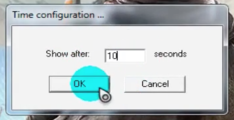 The Time configuration window.


Showcase video
Link
NOTE: The following application contains a screamer!
- mediafire.com/download/obf7o8oeald30d4/Scary.zip
- Mirror: files.screamer.wiki/Scary.zip